
🎯 Learning Goals
- Explain the purpose of prompt engineering and its use cases
- Describe the limitations of large language models like ChatGPT
- Design prompts with specificity and technical language to improve responses
📚 Technical Vocabulary
- Prompt Engineering
- Artificial Intelligence
- Large Language Models
- Tokenization
- Hallucinations
Introduction
- AI is changing the way we program. Tools like ChatGPT can help with debugging, code generation, and understanding complex programming concepts.
- Large Language Models (LLMs) like ChatGPT, Google Gemini, and Claude are powerful coding assistants when used effectively.
- In this lesson, we’ll explore how to craft high-quality prompts to get accurate and useful responses. Why? Because the way you talk to these tools makes all the difference in how useful they are. We’ll share tips and tricks to make sure your AI game is on point.
What is Prompt Engineering?
Prompt Engineering is the art of crafting precise, clear, and specific instructions for AI tools. It is a critical skill for guiding AI models, such as ChatGPT, to produce accurate and useful responses. In the context of Python programming, prompt engineering can help debug code, generate efficient algorithms, and clarify documentation.
Think About It
How have you used LLMs in the past? What are the benefits and limitations?
This is a good opportunity to mention that there are other LLMs outside of ChatGPT. Other popular options include:
- Gemini — Google
- Llama — Meta
- Claude — Anthropic
Demystifying LLMs
- LLMs are essentially very fancy autocomplete systems. They rely on patterns, the context you provide, and huge amounts of training data to predict the next word in a sentence.
- LLMs break down text into smaller pieces called tokens, which the model uses to understand and generate language. Tokens can be as small as individual characters, but are sometimes whole words! For example, the sentence “I love coding!” might be tokenized like this:

- LLMs like ChatGPT process and analyze text at the token level, using patterns in these tokens to predict the next value in a sequence. For example, if you write “The best name for a dog is“ the LLM predicts the most likely tokens to come next, based on its model of human language. In the image below, you can see that while the model selected “Fido” to complete the sentence, there were other likely tokens that could come next such as “R”, “B”, “Spot”, or “Max.” It’s important to note that LLMs are generally set to include some randomness, so it doesn’t always select the most likely token! This is why when you ask an LLM the same question twice, you will likely get slightly different responses.
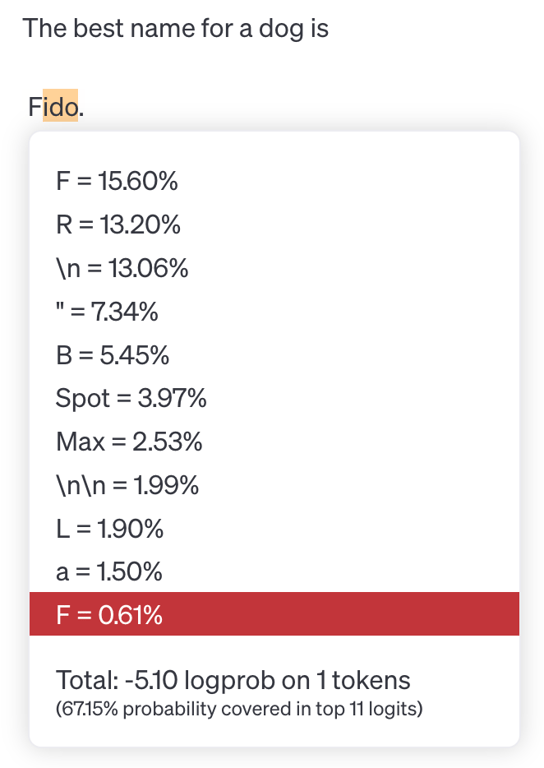
- Once the LLM selects the next token, it doesn’t stop there! Now, it uses the entire original sentence plus the new token to predict the next token after that and so on. This leads to a butterfly effect where small differences in the starting state of a system lead to vastly different outcomes. In the example below you can see that since the sentence was completed with “Fido,” the remaining tokens follow that idea.

- However, if the model had completed the sentence with “Spot” instead, the rest of the response would have been different as well.

- These examples begin to illuminate some of the limitations of AI tools like Large Language Models. The AI is simply guessing the next word based on statistical patterns in its training data, but it can’t really “think” like humans do.
Think About It
Now that you know about how LLMs work, why do you think ChatGPT generated this incorrect response?
From the AI's perspective, "strawberry" is not a sequence of individual letters, but a sequence of token IDs.
Miscounting the 'R's in "strawberry" shows how humans and AI see text differently. We read text naturally, letter by letter, but AI tools, like ChatGPT, chunk text into tokens that combine multiple letters or even entire word parts.
Knowing this helps you use AI better! It’s a reminder that while these models are super smart, they don’t "think" like we do. That’s why they sometimes mess up even on easy stuff.
Other Limitations of AI
- Beware of biases! These models are trained on large datasets that reflect societal biases.
- Watch out for hallucinations. LLMs sometimes make stuff up! Because of the tokenization process, LLMs sometimes generate text that seems realistic, but is actually inaccurate or misleading.
- Think of it like a friend who’s super confident about random facts but sometimes just makes stuff up when they don’t know the answer. For example, if you asked, "Who invented pizza?" and the AI said, "Pizza was invented by aliens in 1850"—that’s a hallucination. It’s not lying on purpose; it just doesn’t know the answer and guesses based on patterns in its training data.
- These hallucinations happen because AI doesn’t "know" things the way humans do. It doesn’t have facts stored like a library—it predicts what sounds right based on the data it’s been trained on. Sometimes those predictions are spot on, but other times... not so much!
- Limited knowledge. LLMs are essentially a snapshot of the world’s knowledge at the moment of their training. For GPT-4 Turbo, the training data cut-off was December 2023. This means the model typically does not have knowledge of recent events unless specifically enabled with a "browse the internet" feature.
AI tools are fantastic at generating ideas and speeding up workflows, but they’re not magic. They’re super advanced word machines that still rely on your input. That’s why learning to craft effective prompts is such a big deal—it helps you get the most accurate and useful results from generative AI tools.
Privacy Considerations
While the model itself doesn’t “remember” things from your conversation, the platform through which you access that model might! For example, ChatGPT is a platform through which you access and interact with various large language models developed by OpenAI, like GPT-4o. As part of this platform (ChatGPT), OpenAI does implement some memory systems to store previous messages and conversations. As with any modern web application, they do collect user data, including the messages you send and any data you share with the application. This means OpenAI could store this data and use it in the training of future models!
For this reason, it’s important to be mindful of the information you share on platforms like ChatGPT. Never share personal or sensitive information, such as passwords or financial details, in a chat with an LLM. Because chatbots can feel personable, it's easy to make this mistake—but it's important to avoid sharing personal details like names, addresses, or other sensitive information.
Did You Know?
You can easily exclude your data from future training by changing the settings in ChatGPT. Click your user icon in the top right corner and select Settings. From there, select Data Controls and then turn Off the option to Improve the model for everyone.
During this course, we’ll use ChatGPT as a helpful coding buddy. Ready to unlock the power of AI for writing Python code? Let’s get started!
Writing Effective Prompts
Follow along with me in ChatGPT! Remember, Large Language Models are trained to have some randomness. This means you might get a different response than the one I get! You’ll probably get similar responses, but not exactly the same.
General Techniques
- ✅ Be Specific — Specify the problem in detail
- ✅ Use Technical Language — Include relevant Python terms and concepts
- ✅ Provide Context — Describe the goal and constraints
Example: Debugging Python Code
"Why isn’t my code working?"
This is too vague. The AI cannot determine what the issue is.
"I'm getting a
TypeError when trying to add an integer and a string in Python. Here's my code: num = 5 + "10". How can I fix this?"This version:
- Specifies the error (
TypeError) and the programming language
- Provides the problematic code (context)
- Clearly asks for a solution
Try-It | Comparing Prompts
- Enter this prompt into ChatGPT or LLM of your choice: "What does it mean if the return value of my function is None?" Read the response carefully and consider how you might improve the prompt.
- Enter this revised prompt into ChatGPT or LLM of your choice: “I wrote a Python function called square that accepts one argument and returns the square of that argument. For example, when I call the function square with an argument of 4, I would expect the return value to be 16. However, when I call the function, it returns None no matter what value I pass in as the argument. Here’s my code:
def square(n):
    n * n

print(square(4))
Please help me correct this error.” Read the response and determine if it is accurate.
- Why did the second prompt result in a more accurate response?
💡 Did You Know?
LLMs like ChatGPT actually do respond better to kindness. “Using polite prompts can produce higher-quality responses,” according to a study by a team at Waseda University and the RIKEN Center for Advanced Intelligence Project. But don’t overdo it! Excessive flattery can result in poorer performance.
Iterative Prompting
So what if you craft or engineer your prompt, but it still doesn’t produce exactly what you were looking for? You can always try again! Generative AI like ChatGPT is like having an infinitely patient friend. You can follow-up and ask it to revise the results 100 times and it will never get annoyed with you.
Iterative prompting is the process of prompting, evaluating the response, and then revising to clarify what you want and prompting again.
- Prompt
- Evaluate
- Revise/Follow-Up
Example: Generating a Function
First Prompt
Write a Python function that removes all even numbers from a list.
First Response
def remove_evens(lst):
    return [num for num in lst if num % 2 != 0]

# Example usage:
numbers = [1, 2, 3, 4, 5, 6]
print(remove_evens(numbers))  # Corrected Output: [1, 3, 5]
print(numbers) # Output: [1, 2, 3, 4, 5, 6]
This meets the requirements of the original prompt, but I actually wanted to permanently modify the numbers list instead of returning a new list. Let’s follow up with additional information to make it more clear what we wanted.
Second Prompt
Thank you! But I want the function to modify the list in place rather than returning a new list. Can you adjust it?
Second Response
def remove_evens(lst):
    lst[:] = [num for num in lst if num % 2 != 0]

# Example usage:
numbers = [1, 2, 3, 4, 5, 6]
remove_evens(numbers)
print(numbers)  # Corrected Output: [1, 3, 5]
This demonstrates how iterative prompting helps us refine solutions, catching logical errors and improving the approach.
Potential Pitfalls
Obviously using AI is a great tool for supercharging your coding, but it’s not magic. It’s important to know when to step away from using AI:
- You aren’t getting the result you want after several revisions.
- You no longer understand the code.
- You are caught in a Copy, Paste, and Cross Your Fingers loop.
‼️ The “Copy, Paste, and Cross Your Fingers” Loop
AI generates some code, but it’s not perfect—it’s got some bugs. So, you ask it to fix those bugs, and sure, it does... but surprise! The new code comes with fresh problems. You go back and ask it to fix those, and now you’re stuck in this endless cycle: copying, pasting, and hoping for the best, all without really understanding what the code is doing. It’s like trying to patch a sinking boat without knowing where the holes are!
AI is a tool — not a replacement for your own logic and problem-solving skills. Take the time to read your code and know when it’s time to walk away from the AI and use your own brain!
Controlling Response Format
- Summarize the purpose of Python dictionaries in 3 bullet points.
- List the steps to process CSV files and output JSON in Python.
- Create a table comparing list comprehensions and for loops in Python.
- Explain recursion in Python using an analogy.
- Describe hallucinations in the context of large language models in 30 words or less.
- Give me an acronym to help me remember how to craft an effective prompt.
Try-It | Use ChatGPT as a Helpful Tutor
Think of a topic you’re unfamiliar with. Ask ChatGPT to explain it to you in whichever format you think would be helpful!
Think of a topic you’re unfamiliar with. Ask ChatGPT to explain it to you in whichever format you think would be helpful!
Other Tips
- Don’t overthink it! Just get started. You can always redirect after getting an initial response. That’s the great thing about using a language model compared to other tools — it’s a conversation!
- If your question is complex, break it into smaller steps! The AI will be more accurate if you break up complex tasks into more manageable steps.
- Ask for explanations. If AI generates code, request a line-by-line breakdown as comments within the code block.
- Verify AI-generated code. AI solutions are not always correct. Read the output carefully and test it before using.
Now, you might be wondering: will AI take over developers’ jobs? 🤔 Honestly, we can’t predict the future (if we could, we’d totally share those lottery numbers with you). But here’s the deal: being a great developer is so much more than just writing code. It’s about thinking critically, solving real-world problems, and creating things with empathy—skills that AI doesn’t quite have.
Practice
- Re-engineer the prompt for specificity, technical language, and context. Assume the following:
- You have a Python list containing first names.
- You want to sort the list alphabetically from A to Z.
- You want to return a new sorted list rather than modify the list in-place.
Original Prompt: How do I sort a list?
- Re-engineer the prompt for specificity, technical language, and context. Assume the following:
- You expect the function to accept the three arguments: the user’s first name, last name, and middle name.
- If the user does not have a middle name, it can be excluded.
- The function should return the greeting as a string instead of printing it.
Original Prompt: Write a function that takes a person’s name and returns a greeting using their full name.
💼 Takeaways
- Prompt engineering is the art of crafting precise, clear, and specific instructions for AI tools
- LLMs use tokenization for processing text and predicting the next word in the sequence
- Use specificity, technical language, and context to improve responses
Next Steps
In this lesson, you practiced writing detailed prompts that give you awesome results. Now, use those skills throughout the camp! Check it out: there's a Gemini button in the top right corner of any Colab playground. Click it to open a Gemini chat right there in the same window – it's like having a coding buddy built-in to the Colab notebook!
For a summary of this lesson, check out the 5. AI-Assisted Coding One-Pager!